
Rate limiting in multi-tenant LLM applications
Introduction
Before deploying a multi-tenant app, managing individual usage and preventing noisy neighbours is one of the most important things to get right. It’s an issue that only presents itself once you have real users and it may be costly to find out you weren’t prepared.
A noisy neighbour is a term applied to tenants who use the app so heavily it slows the system and degrades the experience for everybody else. This can be caused by excess strain on the application hardware or overusing a third party resource such as an API.
This is especially prevalent with apps that rely on AI, because the AI providers have limits and budgets of their own to solve the same problem as us, they don’t want us becoming noisy neighbours or costly users either!
Rate limiting
The way to handle these issues, which you might have guessed already, is to apply a rate limit. This means tracking the usage of individual users and slowing down or stopping them if they start to consume more than is sustainable. There are a number of ways of achieving this with various trade offs.
Fixed window
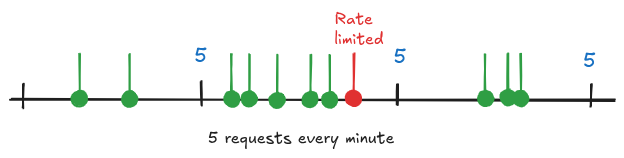
With a fixed window limit, the number of requests that can be made are tracked on a counter per user. Each user’s counter resets on a regular interval, usually 1 minute. It’s simple to implement and robust but unused requests aren’t carried over so it doesn’t handle concentrated bursts of requests very well.
Sliding window
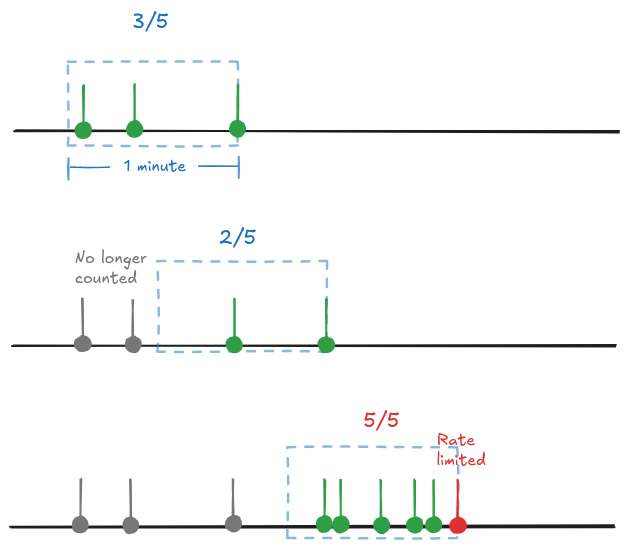
This is a more dynamic way. When a request is received, the number of requests are counted in the previous minute (or whatever the window size). If the count is over the allocated allowance then the request is rejected. This is a bit more complex to implement but it offers a slightly better UX. A busy user who reaches their rate limit might only have to wait a couple of seconds for an old request to expire and allow them to make another. Whereas, with fixed window, they will get quick responses initially until they hit their quota and then have to wait for the window to reset.
Token bucket
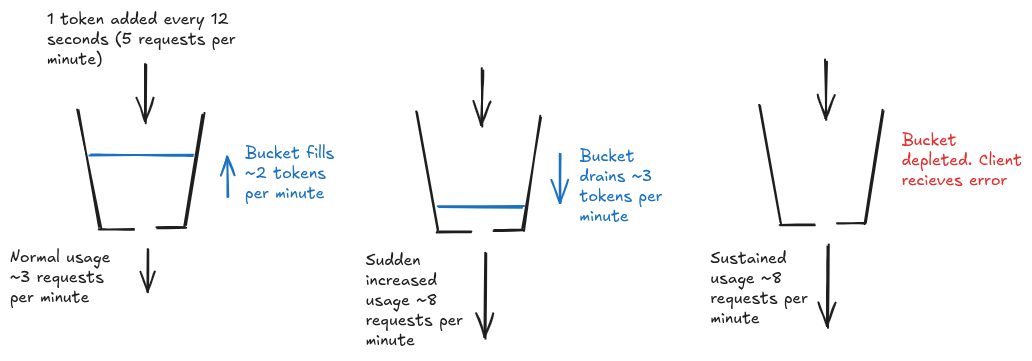
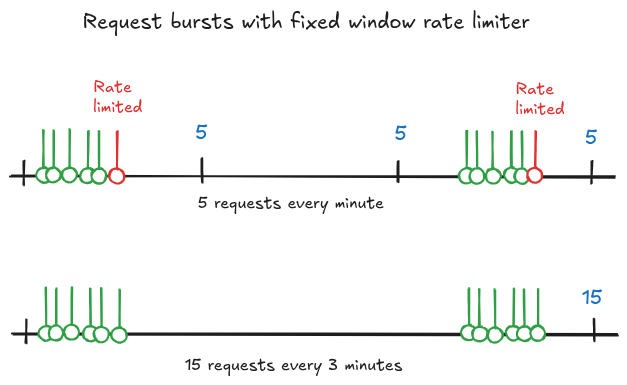
In this algorithm requests are accepted if the requester is able to aquire a token from a bucket. The bucket is refilled with tokens at a fixed rate and when a client wants to make a request to the system they must take a token from the bucket. If the requests are received faster than the refill rate the bucket will start to empty and if there are no tokens left the request will be rejected. As the requests slow down again the bucket will start to fill. The most complicated to implement out of the ones mentioned, but the advantage is it creates a buffer of requests for the user, allowing them to send bursts of requests at a much higher rate by using up their accumulated tokens. Because normal traffic can be bursty it can be worth the extra complexity.
AI Gateway
The problem with implementing the previously mentioned methods is it often means modifying your existing LLM call logic. And more code means more testing and maintenance. Another solution is to pass all the LLM calls through an AI gateway and allow it to handle individual usage.
In our case we are going to look at one called Bifrost. Similar to LiteLLM but written in Go and blazingly fast, it has a feature called virtual keys that we can utilise. By assigning a virtual key to each user, Bifrost can apply rate limits and budgets to requests that contain a virtual key.
This of course is not just a drop-in solution. There is a need to implement the assigning of keys to users and the ability of updating/revoking them. But as well as rate limiting and budgets, there are a host of monitoring and routing features Bifrost offers. We aren’t exploring these in this article but it definitely makes it more appealing as a solution.
Exponential Back off
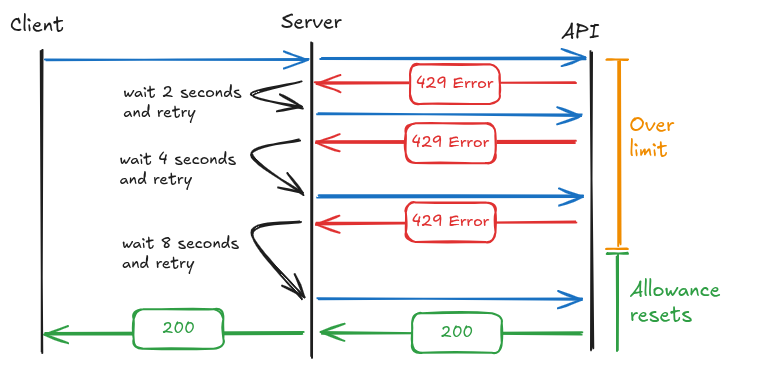
Depending on the implementation, the above rate limits and whatever third party API is being used will return a 429 error if the limit has been reached. 429 is the error code for rate limit exceeded. Returning an error to the client is never good for UX so we try instead to wait and retry if possible. This can be achieved with an exponential back off. Essentially if a request receives 429, wait 2 seconds and try again, if still 429 then wait 4 seconds, then 8 and so on until successful or either a max retries or maximum time has been reached. Sometimes a 429 error also returns a Retry-After header containing a timestamp and that can be used more effectively so a good back off method will check for this first.
Testing using a simulator
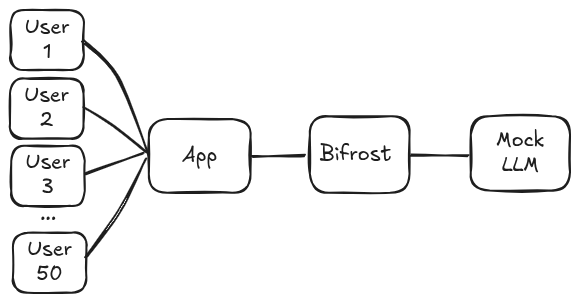
Like previously mentioned, we can’t actually see how well a rate limit strategy works until we have real users. So out of curiosity I built a small simulator app that would allow me to visualise the noisy neighbour problem in action and see the difference to latency and errors when applying a rate limiter to individual users. It is made up of 4 main components:
User simulator
This uses aiohttp to spawn 50 concurrent requests each polling at a random interval. Users can be assigned Pro or Basic so that different rate limits can be applied to each and their usage behaviour can be changed to make some of them the “noisy neighbours”. As well there are options for the overall usage, a multiplier that increases or decreases all users average rate to give the impression of high and low traffic.
App backend
This is to simulate our app. This is a simple API endpoint the simulated users can send requests to and will in turn make the call to the LLM. Think of the fake users calling the endpoint the same as real users sending requests via a chat interface, the difference being our fake users don’t need a UI so we just send the requests directly backend to backend.
Mock LLM
The Mock LLM. I initially looked at llm-mock and llmock. They both have their merits but I went with llm-mock first since it generates random Lorem Ipsum responses whereas llmock requires you to define fixed response templates. Neither support rate limiting though, so I had to put a sidecar service in front to rate limit requests using a sliding window in a similar way to OpenAI. The other issue was llm-mock only lets you control response length in sentences, and I wanted token-level control to match the real distributions. So in the end I just extended the rate limiting sidecar into being the mock LLM itself and dropped llm-mock entirely.
Bifrost
Because we are testing Bifrost we need to add this to the stack. We position this between the app backend and the mock LLM and pass our calls through it. The app has controls for assigning/revoking virtual keys using Bifrost API and the values of the limiter and budget can be adjusted.
User interface
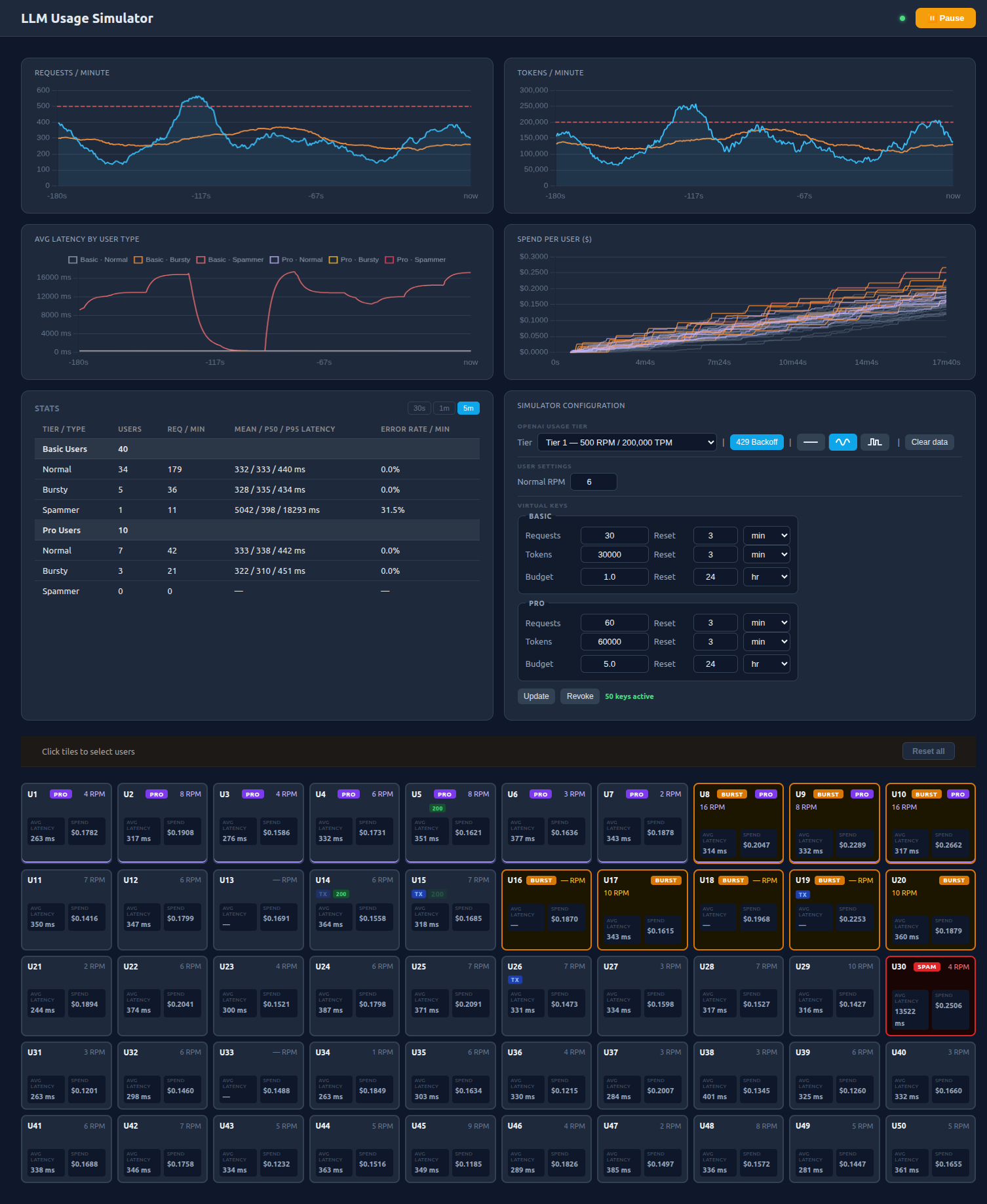
The user interface allows me to control the behaviour of the components from one central place and visualise the result. The individual users are presented in a grid and each one can be selected and assigned a behaviour and user type. The exponential backoff can be switched on and off in the app backend and Virtual keys can be configured, applied and revoked from Bifrost.
Simulating users
When building this I really wanted to create user archetypes based on real world usage so I analysed the allenai/WildChat dataset. It contains real AI chat conversation data with hashed IP addresses, conversation ID, and timestamp. With this the intention was to map the real behaviour of users to simulated ones, but there was a few issues with this.
For one the IP address is not reliable for identifying users. Mobile users are frequently reassigned IPs due to dynamic allocation and on top of that, many users share a single public IP on office or university networks, meaning completely different people can look like the same user. I thought of linking IP addresses with conversation IDs and vice versa which did seem to narrow down individual users but it’s still unreliable.
The distribution is highly skewed. A small percentage of users make the majority of requests. I had considered grouping light users into a single user class and combining their request rates, but once you start manipulating the data you lose the realism and the whole thing becomes pointless.
After going down quite a bit of a rabbit hole I decided it really wasn’t necessary for complete realism. And on top of this, data from AI chat may not be relevant if an app is for something completely different like summarising someone’s inbox or classifying images for example. The usage would look completely different.
So instead I thought about what I actually needed. Individual users where the majority are using the system at a sustainable rate and the ability to introduce very noisy users and see the effects. So in the end I went with 3 user behaviour types
- Normal users: steady 6 RPM with slight random variation
- Burst users: average 6 RPM over several minutes but the requests are grouped into a concentrated burst
- Spammy users: hit the API as fast as possible with no delay other than waiting for a response
The research was not a complete waste of time and I did manage to use the conversation data to simulate pseudo realistic prompt and response token distributions that could be used in both the simulated users and the mock LLM.
Results
I ran this simulator on a number of different configurations to visualise the effects. In each test 30 users are Basic and 20 are Pro. Between tests I ran the simulator for roughly 10 minutes to let the values settle.
Normal and burst users only
In this test 40 users are set to “Normal” and 10 to “Burst”. From the results table the mean, p50 and p95 are all fairly similar meaning no user is being affected by this usage. Note that the mock LLM applies a random delay around 300ms to requests.
| Tier / Type | Users | Req / Min | Mean / P50 / P95 Latency | Error Rate / Min |
|---|---|---|---|---|
| Basic Users | 30 | |||
| Normal | 25 | 170 | 375 / 337 / 440 ms | 0.0% |
| Bursty | 5 | 28 | 361 / 316 / 443 ms | 0.0% |
| Spammer | 0 | 0 | — | — |
| Pro Users | 20 | |||
| Normal | 15 | 93 | 348 / 328 / 446 ms | 0.0% |
| Bursty | 5 | 28 | 358 / 329 / 440 ms | 0.0% |
| Spammer | 0 | 0 | — | — |
Introducing the Bad Actors
Now if we add a couple of spam users it absolutely nosedives the UX for everybody else. The p50 is largely the same but we can see the mean and the p95 increasing, signaling that some users are now being hit quite badly with the rate limit.
Not all users are being hit equally and whether a request sails through or gets caught in a backoff cycle depends on the timing, if it arrives just as older requests are expiring from the window it succeeds otherwise it gets rejected and has to wait. So instead of all users seeing a mean latency of around 900ms, noticeable but not hideous for an LLM API, some are getting hit with 5000ms+ waits which will feel quite slow.
| Tier / Type | Users | Req / Min | Mean / P50 / P95 Latency | Error Rate / Min |
|---|---|---|---|---|
| Basic Users | 30 | |||
| Normal | 24 | 145 | 989 / 344 / 5394 ms | 0.0% |
| Bursty | 5 | 22 | 928 / 353 / 5369 ms | 0.0% |
| Spammer | 1 | 64 | 667 / 349 / 5274 ms | 0.0% |
| Pro Users | 20 | |||
| Normal | 14 | 85 | 943 / 349 / 5331 ms | 0.0% |
| Bursty | 5 | 28 | 693 / 344 / 5258 ms | 0.0% |
| Spammer | 1 | 66 | 633 / 324 / 5286 ms | 0.0% |
Exponential backoff removed
Something I added to the simulator was the ability to toggle the exponential back off. With the same configuration as the previous test but with it switched off. The latency is closer to the baseline test because errored requests are being returned immediately. So although that latency looks better it means that about 1/5 of the users requests are hitting the mock LLM rate limiter and getting rejected. Increased latency is of course better than just straight up sending an error to the user so we don’t want to keep this setting, but seeing the error rate without it is quite telling to what is going on.
| Tier / Type | Users | Req / Min | Mean / P50 / P95 Latency | Error Rate / Min |
|---|---|---|---|---|
| Basic Users | 30 | |||
| Normal | 24 | 159 | 270 / 297 / 436 ms | 19.3% |
| Bursty | 5 | 34 | 264 / 300 / 437 ms | 21.9% |
| Spammer | 1 | 107 | 279 / 303 / 438 ms | 15.5% |
| Pro Users | 20 | |||
| Normal | 14 | 86 | 270 / 302 / 436 ms | 19.5% |
| Bursty | 5 | 38 | 275 / 317 / 437 ms | 19.8% |
| Spammer | 1 | 102 | 289 / 309 / 441 ms | 12.7% |
Assigning Virtual Keys
To bring fairness to my currently lawless simulator we can assign the virtual keys to our imaginary users. For the first test the users were assigned 10RPM and 10,000TPM (Basic) and 20RPM and 20,000TPM (Pro).
The results show the normal users are now seemingly untouched by the noisy ones and back to the latency we saw originally. However, our bursty normal users are still getting nerfed quite badly by the rate limiter, even though they are sending on average 6RPM each. Bifrost’s rate limiter is not a sliding window like OpenAI. It’s a fixed window resetting at the end of the specified time. What I believe is happening is some of the burst users are using up their quota and then getting rate limited before it has reset again.
| Tier / Type | Users | Req / Min | Mean / P50 / P95 Latency | Error Rate / Min |
|---|---|---|---|---|
| Basic Users | 30 | |||
| Normal | 24 | 136 | 442 / 327 / 461 ms | 0.6% |
| Bursty | 5 | 31 | 1343 / 346 / 13357 ms | 5.8% |
| Spammer | 1 | 13 | 4492 / 374 / 17823 ms | 20.6% |
| Pro Users | 20 | |||
| Normal | 14 | 90 | 325 / 319 / 444 ms | 0.0% |
| Bursty | 5 | 31 | 329 / 322 / 443 ms | 0.0% |
| Spammer | 1 | 23 | 2328 / 356 / 14337 ms | 12.3% |
To remedy this, instead of rate limiting every minute I increase the window to 3 minutes and 3x the RPM and TPM allowance. Essentially this allows the burst users to “borrow” tokens they can’t afford and pay them back in the long silence between requests. Of course, in theory, because the collective limits of all users are now well over the downstream rate limits, if every user decided to spam the system at the exact same time they would overwhelm the system. This is incredibly unlikely, however, and in any regard that level of simultaneous user activity could not be solved easily with a rate limiting strategy and would require increasing the AI providers or the usage tier to accommodate.
| Tier / Type | Users | Req / Min | Mean / P50 / P95 Latency | Error Rate / Min |
|---|---|---|---|---|
| Basic Users | 30 | |||
| Normal | 24 | 146 | 427 / 336 / 466 ms | 0.1% |
| Bursty | 5 | 32 | 475 / 340 / 484 ms | 0.0% |
| Spammer | 1 | 15 | 3623 / 369 / 16493 ms | 23.0% |
| Pro Users | 20 | |||
| Normal | 14 | 77 | 405 / 331 / 448 ms | 0.0% |
| Bursty | 5 | 30 | 363 / 328 / 443 ms | 0.0% |
| Spammer | 1 | 25 | 2052 / 355 / 14909 ms | 11.2% |
As we can see the burst users are fine now. The spam users still have a huge latency and error rate. Again due to the fixed window once the spam users meet their quota the back off retry has a max duration of 30 seconds, so it is repeatedly timing out causing errors. There could be a workaround for this but we are trying to protect the experience of our normal users and ourselves. Also, apart from assigning keys, the API logic should remain the same.
Budgeting
So we made our noisy neighbours turn the music down, but even at this sustainable rate, continuous use over a long period of time can still run up a huge bill. We need to apply a budget to our users. Again, this can be done using Bifrost virtual keys. Each key can be assigned a budget and a time period to reset the budget on. So in its simplest form you could set the user budget to below their subscription fee and be sound in the knowledge they won’t cause you a loss.
This could be quite a tricky one to get right in terms of user experience. If they use up their monthly quota in the first week they will most likely churn unless you have some mechanism for topping up. It’s possible to make a GET request against the virtual keys and see the remaining budget. This could be polled and used to update a UI element so the user can track their usage.
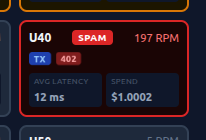
This budgeting was added to the simulator as well and could be adjusted. I set the Basic users to $1 every 24 hours and $5 for Pro. I then ran the simulator until our basic spam user racked up their hefty $1 charge and sure enough they were blocked.

This is the user tile that has hit the $1 budget and can no longer send requests. Ignore the blistering RPM and latency it’s because the simulator doesn’t back off on 402 errors.
Conclusion
We can see from the tests how badly noisy neighbours can affect the experience of regular users if not handled in some way. Even a couple of spam users was enough to push the latency from ~400ms to over 5000ms for regular users of the app. We also saw in practice what we noted earlier about fixed window rate limiting, that burst users were suffering high latency despite averaging the same rate as a normal user. Bifrosts individual rate limits use a fixed window so what we see in our results reflects this. The solution was to widen the window to get more of an average across the burst users requests, however, this does make the system slightly more vulnerable to spikes of traffic.
Using an AI gateway like Bifrost proved to be an effective solution. The main advantage is that per user rate limits and budgets can be applied without touching any of the existing LLM call logic. The budget feature in particular is valuable, being able to set a hard spending cap per user on a rolling period means a busy user can’t rack up a huge bill. And, although not fully demonstrated in this article, Bifrost has many other monitoring and routing features that make it an attractive choice.
What I’d like to explore next is what happens when the system is overwhelmed by regular users rather than a couple of bad actors and whether there is a fairer way to distribute capacity without the skewed latency we saw. The simulator is a good platform for that, for testing the other rate limiting strategies mentioned earlier, and also for exploring more of Bifrost’s features.
If you’d like to run the simulator app the repo is here